Tuesday, 28 April 2015

Week 11 Tutorial: Hi-fi Prototype


During this tutorial, we focused on understanding what type of emotional response we want from our users. Whether it is an excited feeling or pleasant feeling cash be found out through creating a questionnaire. Also it is important to include several words or create a number scale to describe the emotional impact, as the word excited can vary in meaning to different people. The ideal emotional impact I wanted is the user is not hindered by the applications functions, and enjoys the bright aesthetic of the design, all while feeling like the application offers a comfortable social environment to freely discuss.

I quickly trialed my application with some classmates and the overall response was good. Minor things needed to be altered such as the colour of the lecture tag being too similar to a hyperlink. The colour bright color theme was not irritating and the overall style did not seem to bother any of them. However this was only a quick trial and I did not give them a questionnaire afterwards, meaning the results from my quick trial are fairly vague. Although the results give me an idea into what other peoples store taste is, also seeing if they can understand the functionality of the application as well since they are my target audience too.

People interpret language and design differently but I need to understand my target audience's interpretations, in order to further improve my application. An example of this is shown in the image below as these flowers can also mean different things to other people, despite the labeling.


Bibliography:

1.bp.blogspot.com,. (2015). Retrieved 29 April 2015, from https://blogger.googleusercontent.com/img/b/R29vZ2xl/AVvXsEjq-bMM_k_GsEK0E05nwI7O8zY1htaJKLLhmhzIvnUGU5jeUC4CTxJI765348nZJVDFrdAsl_1D_prqW-jANRFUvh3BgNdN_wVn6V9oCFvtpFeQUsxKkjb-rMGJdmVESKwoQXytOmXt9tk/s640/flowers+delivery+in+boston-resized-600.jpg.png

Week 9 Tutorial: Information Design

During this tutorial we focused on bringing our wireframes from the previous assignment into Invision, in order to get a feel for how the program works. I added in my wireframes and quickly learnt the basics and began to create my own application draft. I based my idea around a similar application to my idea and added my own theme to it. I wanted my application to create a comfortable social environment for people to freely discuss, as my application is basically a forum within an app. In order to achieve this I began with a playful name for the application being "Noodle Forums" which sets the mood or tone of the application just through the name. However the application still needed to function similar to a serious application, meaning I had to look at other similar applications to check if I am including all the necessary features and actions.

The theme of my application is a bright teal green which lightens the mood of the user due to it's brightness, adding onto the experience of the application. The overall aesthetic of the application is clean and sharp, while still maintaining a modern look. I chose to only add the necessary functions as overloading a user can lead them away from using it. The only issue I am faced with now is I have not created anything that is considered new when using forum application, whether or not that is necessary I do not know. Since users would only be looking for a place to discuss ideas and assignments, meaning anything out of their comfort zone may hinder their experience of the application.


Bibliography:

1to1media.com,. (2015). Retrieved 28 April 2015, from http://www.1to1media.com/weblog/customer%20experience%20predictions.jpg

Tuesday, 7 April 2015

Week 7 Tutorial: Project 1 Feedback

This tutorial was focused on obtaining feedback from the tutor. I brought in my completed draft and found out several small issues in my report. One being I did not come up with the idea quick enough in the report, making the research look unrelated to my idea. Therefore I added extra lines to explain when I thought of my idea to improve the context of the research. Another issue was my titles not suiting the content I put underneath them, which was an easy fix. Also my Abstract did not fit into the report since it written as if the report was already done, when it is meant to be write as if I was only starting on the concept.

To further round out my report, I will need to work on creating a stronger conclusion. As my conclusion feels too brief and needs more explanation. Overall my report is coming along nicely and I will be working towards fixing the smaller issues before solving the larger ones.


Bibliography:

B-i.forbesimg.com,. (2015). Retrieved 28 April 2015, from http://b-i.forbesimg.com/joefolkman/files/2013/12/feedback-heads1.png

Tuesday, 17 March 2015

Week 5 Tutorial: Demographics, Psychographics and Personas

During this tutorial we looked at the importance of targeting our user precisely. I originally started with my target audience to be students who live far away from univetsity, or people who are unable to make friends in university. Since my website idea allows students to group together and discuss assignments online, which would ideally form it's own community as it looks like a majority of students would use it. However to actually be encouraged to participate within the website, this requires the student to be motivated enough about their work. Now to zone in on a particular target audience I am focusing on students who want to succeed in university, but they lack the connections to discuss ideas or share queries with.

We were told to design a persona who would use or product. After attempting this activity, it helped me to brainstorm the situations where my website would help solve the problems of the users. I tried to focus on the details that prevented students from participating in the community that UC already has. One example being students not being able to establish a strong enough connection with classmates to further talk outside of classes, this leaves them with no one to talk with as moodle's forum is seen as too serious to discuss little things.

The question of 'will it just be another Facebook?' Came up from the tutorial. To answer this my website will help to filter out all the unmotivated students, leaving only motivated students discussing, sharing, ideas and insights. Leading to a stronger community rather than just making a Facebook group around an  assignment. Also I need to figure out what type of problems online students experience, in order to further improve my website and distinguish it from regular forums.


Bibliography:

Marinersoftware.com,. (2015). Retrieved 18 March 2015, from https://marinersoftware.com/media/images/products/persona/persona-all.png

Tuesday, 10 March 2015

Week 4 Tutorial: User Expectations and Needs vs Wants


In today's  tutorial we discussed our ideas with fellow classmates, then moved on to pitching our idea to the tutor for feedback. My idea for assignment 1 was to create a place where students can discuss assignments with each other, as well as join or create study sessions. The idea was based around getting students to seek help without fear of embarrassment. Since the study help forum I would create would have a less formal feel towards it, encouraging more students to post questions or join in discussions as there will be group discussions related to particular assignments.

After bouncing my idea around and getting feedback, I found multiple things I had not took into consideration. I did not think about who will be posting on the forum as their is no incentive except kindness. Also my idea is heavily community based so without a solid community there is nothing to discuss. In order to gain a community I need a strong cause to bring people together for discussion. I need to figure out if assignments and general classwork is a strong enough cause to establish a community around my idea. Also I need to look into why students don't use the moodle forum. Is the format to formal for students to ask common questions? I still need to do more observing and researching, especially in terms of understanding what users want from my idea and how they will achieve what they want.


Bibliography:

P2cdn4static.sharpschool.com,. (2015). Retrieved 11 March 2015, from http://p2cdn4static.sharpschool.com/UserFiles/Servers/Server_5439645/Image/Community%20Logo.jpg

Tuesday, 3 March 2015

Week 3 Tutorial: User Centric Design and Requirement Gathering

During this tutorial we discussed are ideas for the first assignment of helping university students adjust. A potentially effective idea was trying to get students to get more comfortable in class through more group activities, or more events to try and get people together. This idea can help ease the pressure of university as you get to meet people going through the same experience. Once we spilt into smaller groups, this idea developed into a anonymous forum where students do not feel scared to ask questions about the small things. This helps to fill in the gaps in knowledge that first years struggle to find. By making it anonymous it promotes more people to post on the forum as it does it come under your own name, therefore there is not embarrassment associated with your name.

However after discussing the idea further, the anonymous forum can be an addition to a larger idea. The intention of the forum was to help introduce new first years to university life, so this can be done much faster through creating something like a frequently asked questions page focused on first years. Then you can have a anonymous forum on the side of that page. In order to further develop this idea I am going to need to survey students what they want and expect from the frequently asked questions page. One issue I discovered with this idea is the longterm use of it, since it would need to be constantly updated with new information. This would require someone who has experienced the first year experience to provide detailed answers.Overall I have discovered that my simple idea needs more thought and research in order to develop. However I am trying to target what causes the fear or pressure that first year students experience, and then build something from that. As well as look into why people prefer being anonymous when asking questions and the power of being anonymous.


Bibliography:

Dyadmusic.co.uk,. (2015). Retrieved 4 March 2015, from http://www.dyadmusic.co.uk/wp-content/uploads/2014/01/UnknownCopyrightLicence.png

Tuesday, 24 February 2015

Week 2 Tutorial: What Is Good Or Bad Interface Design?

During this tutorial we explored how to distinguish good and bad interface design. From several comparisons of good and bad designs, I discovered that good interface design comes from the product meeting the user's needs and expectations. Also I learnt that the interface design is also based on the target audience. For example, my group compared an old version of windows movie maker to the latest version. The old version offered more options and customization, whereas the newer version removed most of the options to not overwhelm the user. Now considering windows movie maker is not considered a more professional video editor program, they decided to follow through with this image and simplified the design. The simplified version does make it harder for old users, but new users will not be overwhelmed.

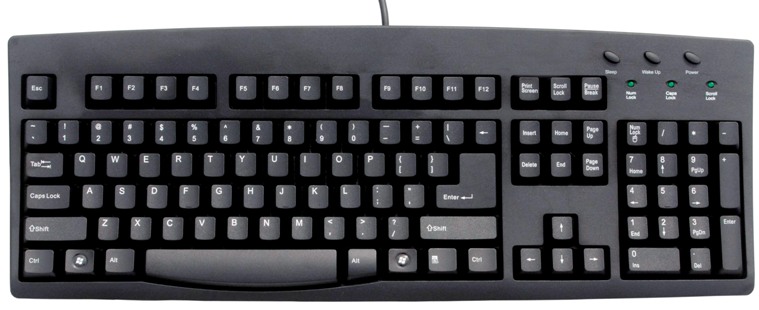
I also did a quick comparison between two generic desktop keyboards, the windows keyboard and the macs keyboard. The windows keyboard opts for a more spaced out layout through separating each of the sections of keys accordingly. The amount of space between the keys allows users to easily distinguish which section they are typing from.The mac keyboard tries to use as little space as possible, this is done through lowering the size of the buttons that are used not as often. Also lowing the space through grouping the keys closer together. However through grouping the keys together it makes it harder to distinguish which keys are part of which section. Therefore the windows keyboard will not interrupt the user's experience as it disregards the style of the keyboard for usability. Whereas the mac keyboard has a better aesthetic, but the keys are small, slippery and closely grouped which may cause accidental mistyping, interrupting the user's experience.


Bibliography:
Duncantang.com,. (2015). Retrieved 25 February 2015, from http://www.duncantang.com/sites/duncantang.com/files/field-images/2014/1217-mac-keyboard-shortcuts.jpg.

Turningpointtechnology.com,. (2015). Retrieved 25 February 2015, from http://www.turningpointtechnology.com/img/KB/STK/260ABPKBG00.jpg